
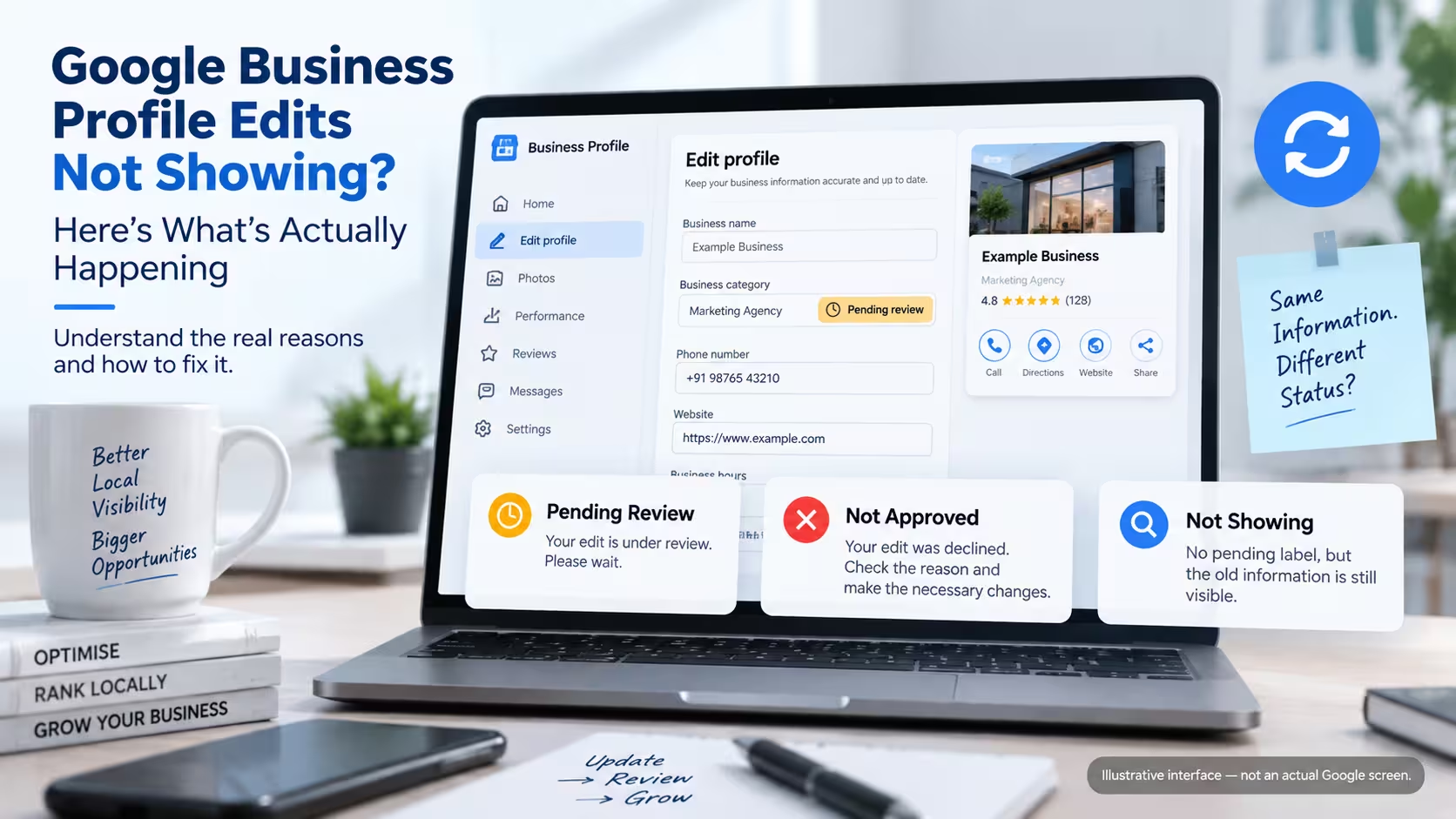
If you changed something on your Google Business Profile and the old information is still showing, the edit may be pending, declined, not saved correctly, or affected by a broader profile issue. The right fix depends on identifying which of these you’re actually dealing with — and most business owners never get past assuming it’s the first one.
Google reviews every edit before it goes live. According to Google’s own guidance, that review usually takes about 10 minutes, but sometimes it takes up to 30 days. In practice, where you land in that range often depends on what you changed — a phone number or hours update tends to move faster than a name, address, or category change, which can draw extra scrutiny. The gap between those two numbers is where most of the confusion lives, and it’s exactly where this guide is going to help you.
Table of Contents
What “Pending,” “Not Showing,” and “Rejected” Actually Mean
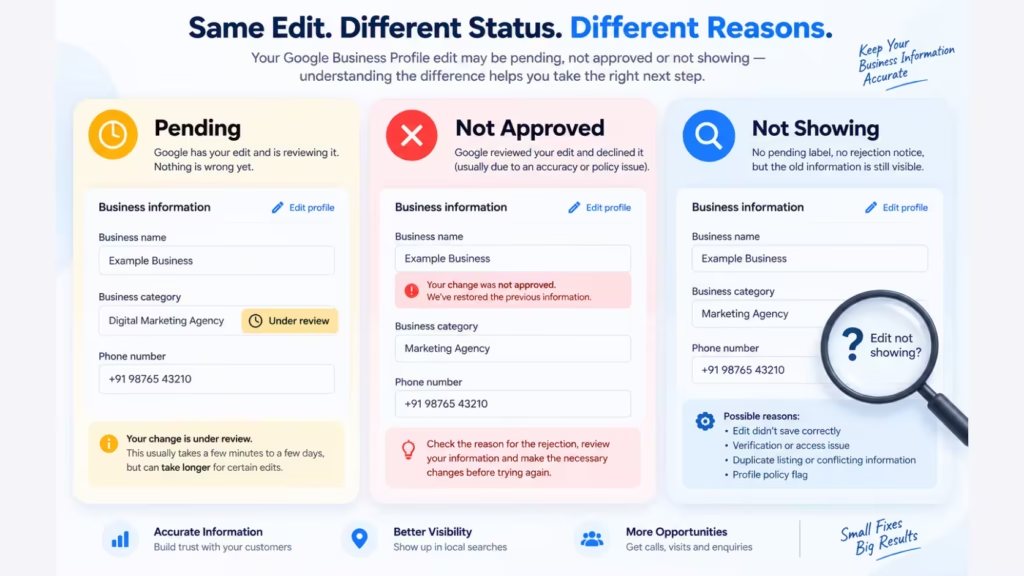
These three situations look similar from the outside — your profile still shows the old information — but they’re not the same problem, and they don’t have the same fix.
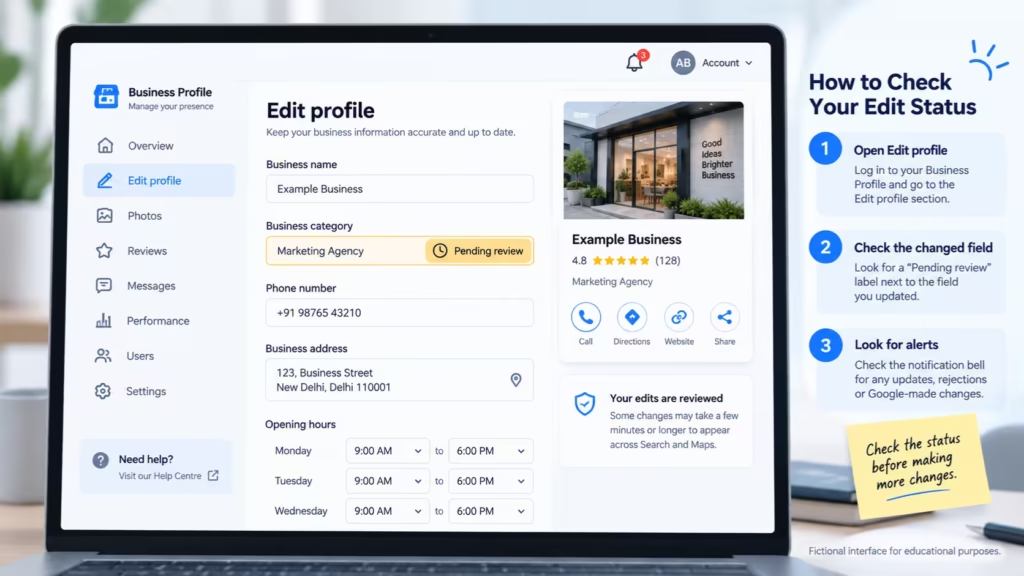
Pending means Google has your edit and is reviewing it. You’ll usually see a small “pending” label next to the field in your Business Profile dashboard. Nothing is wrong yet. This is the waiting stage.
Not approved (sometimes just shown as your change quietly reverting to the old value) means Google reviewed the edit and declined it — usually because it couldn’t confirm the new information was accurate. You may be able to appeal this, but only after you understand why it was declined.
Not showing at all, with no pending label and no rejection notice, is the trickiest one, because several different things can cause it. If you’re in this situation, check these in order:
- Was the edit actually saved? Reopen the field and confirm the new value is still there.
- Is the profile verified and properly managed? Check ownership and access before assuming the edit itself is the problem.
- Is there an alert you’ve missed? Look for a notice about a Google-made change or a policy flag.
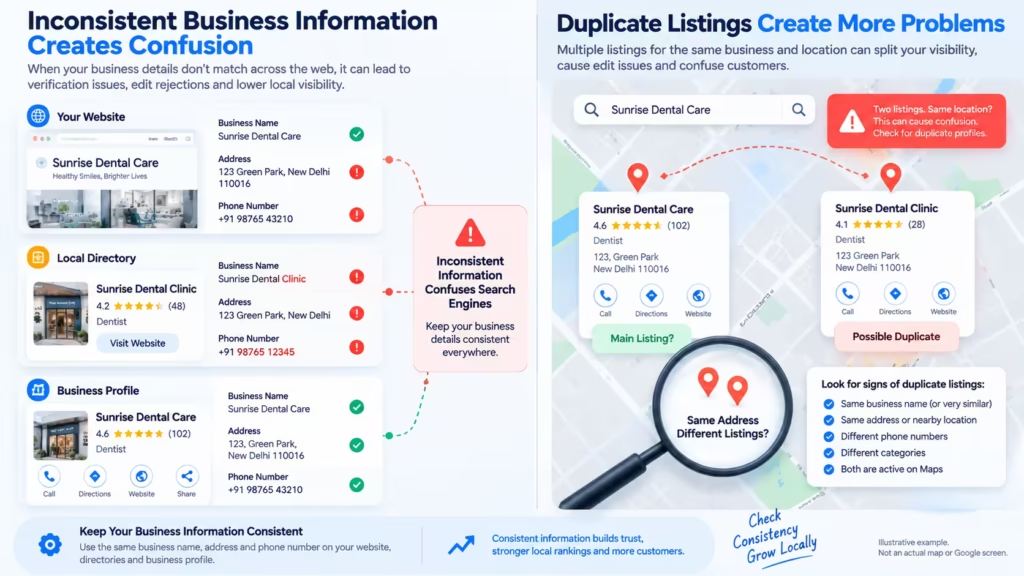
- Is another listing involved? Search Maps for a second, older, or duplicate profile for the same location.
- Is the old information showing everywhere, or just in one place? Compare Search, Maps, and your website — inconsistency between them points to a different problem than a single stuck edit.
- Has this continued for several weeks? At that point, treat it as worth a proper look rather than continuing to wait.
There’s a fourth situation worth knowing about: Google sometimes changes your business information itself, based on reports it receives from other sources — your website, review platforms, or public edit suggestions on Maps. If you see a change you didn’t make, check the “Edit profile” section for an alert before assuming something is broken.
Why Some Edits Behave Differently Than Others
Not all fields on your profile go through the same level of scrutiny. This is one of the more useful things to understand, because it explains why your phone number update went live in minutes while your category change has been stuck for a week.
Business name changes get reviewed carefully, especially if the new name doesn’t closely match your legal or storefront name, or if it includes a keyword that looks like it’s being added for ranking purposes rather than accuracy. This is one of the most commonly rejected edit types.
Category changes are generally evaluated against whether the new category accurately represents the business and is consistent with information available about it elsewhere. A physiotherapy clinic switching its primary category to “Hospital” is likely to get more scrutiny than switching to “Physical therapist.”
Address changes are treated as high-risk by default. Google is actively trying to prevent fake relocations and address fraud, so even a legitimate office move can trigger a longer review, sometimes with a request for supporting documentation. Frequent address edits — even correct ones — can also flag the profile for a closer look.
Hours updates — including one-off holiday hours — are usually the fastest to process and rarely blocked, unless the profile itself is already flagged for another reason.
Service and description edits sit somewhere in the middle. They’re low-risk individually, but if you’re editing them repeatedly in a short window, Google’s systems may treat that as unusual activity and slow down the review.
Related:- Why Is My Competitor Ranking Higher on Google Maps?
Not Sure Why Your GBP Edit Isn’t Showing?
Before making more changes, find out whether your edit is still pending, was rejected, or simply hasn’t appeared where you’re checking. We can help you understand what’s actually happening.
How to Check Whether Your Edit Is Actually Still Pending
Before troubleshooting further, confirm what state the edit is actually in:
- Open your Business Profile directly (through Google Search — search your business name — or through the Business Profile Manager).
- Go to the “Edit profile” section and look at the specific field you changed. A pending edit shows a visible label next to it.
- Check for a notification bell or alert icon at the top of the dashboard — this is where Google flags both your own pending changes and any it has made on your behalf.
- If there’s no pending label and no alert, but the old information is still showing publicly, the edit likely didn’t save correctly. Try re-entering it once, carefully, rather than repeatedly.
Step-by-Step Troubleshooting Checklist
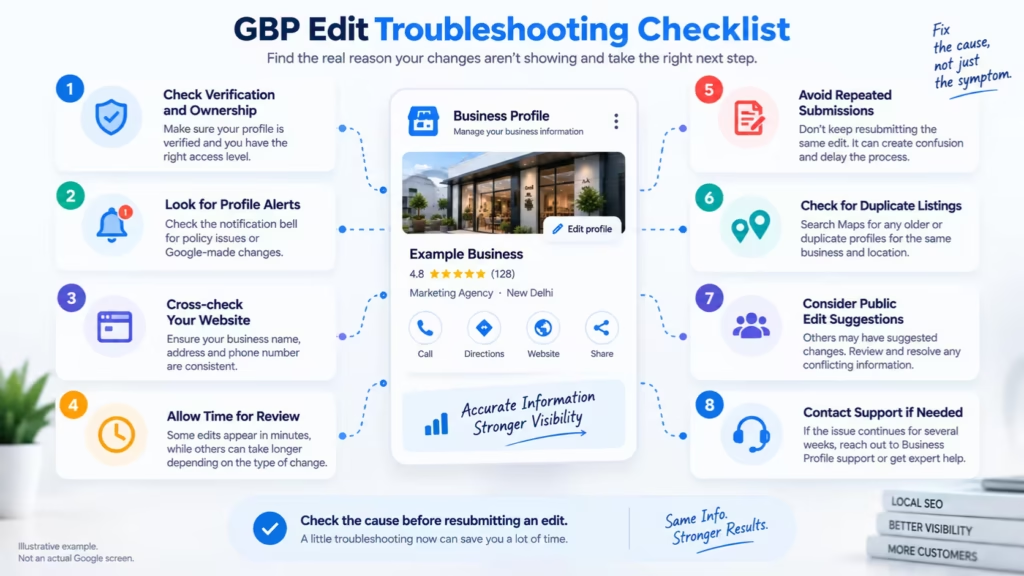
Work through this in order. Most issues resolve somewhere in the first four steps.
- Confirm verification status. Unverified profiles have limited editing ability. You can still update name, category, address, hours, phone, and website, but everything else requires verification first.
- Check for existing alerts. Look for a notification about Google-made changes or a policy flag before assuming your own edit is the problem.
- Cross-check your website. Google frequently compares your Business Profile against your website’s name, address, and phone number. A genuine mismatch here can trigger additional review, especially for name, address, or phone-number edits.
- Wait out the standard window. If it’s been under 10 days, this may simply be normal review time, especially for address or category changes.
- Avoid resubmitting the same edit repeatedly. Re-entering an edit that’s already pending is unlikely to speed up the review, and can make it harder — for you and possibly for Google’s review systems — to tell which version is the current one. More on this below.
- Check for duplicate listings. A second, older, or unclaimed listing for the same location can interfere with how changes propagate to the “correct” listing.
- Review recent public suggestions. If someone else suggested an edit to your listing (via the “Suggest an edit” option on Maps), it may be sitting in your dashboard for approval or rejection — sometimes mistaken for a stuck edit of your own.
- If it’s been 30+ days with no status change, that’s the point to contact Business Profile support directly or bring in someone who handles this regularly.
How to Spot Incorrect or Conflicting Business Information
This is the part most troubleshooting guides skip, and it’s often the actual root cause.
Google doesn’t evaluate your Business Profile in isolation. It’s reasonable to assume it can cross-reference your name, address, and phone number (often shortened to NAP) against your website, existing citations on directories, and information submitted by other users. Inconsistent information across these sources — an old address still listed on a directory, a slightly different business name on your website footer, a phone number that’s been reassigned — can create confusion or trigger additional review, particularly for name, address, and phone-number changes, without Google ever explaining that to you directly.
A useful gut check: pull up your website’s contact page and your Business Profile side by side. Check whether the core details are consistent and clearly represent the same real-world business — they don’t need to be formatted identically, but a genuinely different name, address, or phone number across sources is worth fixing before you spend more time re-submitting the same profile edit.
Is Conflicting Business Information Causing the Problem?
Incorrect names, addresses, categories, services or other business details can make GBP troubleshooting more complicated. Let us review the profile and identify the information that needs attention.
When Verification or Policy Issues Are Actually Blocking the Edit
Some edits aren’t stuck because of a technical delay — they’re blocked because something about the profile itself doesn’t currently meet Google’s guidelines.
This is different from a suspension. A suspended profile is removed from search and Maps entirely. A policy-blocked edit usually means the profile is still visible, but a specific type of change — often address, category, or name — is being held because of something Google flagged: an unclear business model (a virtual office listed as a storefront, for instance), a category that doesn’t match the services actually offered, or a recent pattern of edits that looks automated or manipulative.
If you’re not sure which situation you’re in, that distinction matters, because the fix is completely different. Trying to force through an edit on a policy-flagged profile by resubmitting it repeatedly is one of the more common ways businesses accidentally trigger a full suspension.
Mistakes That Make the Problem Worse
Beyond repeated resubmission, two other patterns show up often in profiles that end up stuck for weeks instead of days:
- Changing multiple sensitive fields at once — name, category, and address in the same session — instead of spacing them out.
- Treating a stuck edit and a suspended profile as the same problem. The two need different fixes, and applying suspension-recovery advice to a simple pending edit (or vice versa) usually wastes time.
When to Wait, When to Investigate, and When to Get Help
Wait if it’s been under 10 days and you’ve only made one change. This is the normal review window for most edits.
Investigate yourself if it’s been 10–20 days, or if you’ve made more than one change recently. Work through the checklist above — most causes are things you can identify and fix without outside help.
Get a professional to look at it if you’ve passed 30 days, if the edit was rejected and you’re not sure why, if you suspect a NAP mismatch or duplicate listing you can’t locate, or if this keeps happening across multiple locations. At that point, the cost of continuing to guess usually outweighs the cost of a proper audit.
*A common scenario, illustrative rather than a specific case:* a clinic tries updating its service list several times over two weeks after adding a new specialisation. Each resubmission fails to resolve anything, and the status becomes harder to track with every attempt. In situations like this, the underlying cause often turns out to be a second, unclaimed listing for the same location — created years earlier by a directory aggregator — that appears to be interfering with which profile Google treats as current. Once a duplicate like that is identified and merged, the original edit typically goes through without further changes.
What a Professional GBP Audit Actually Uncovers
A proper Google Business Profile audit isn’t just re-entering your information and hoping it sticks. It typically involves:
- Checking for duplicate or conflicting listings tied to the same address or phone number
- Comparing your Business Profile data against your website and major directories for NAP consistency
- Reviewing the profile’s edit and verification history for prior flags or rejections
- Identifying whether a pending edit is a simple review delay or a symptom of a category, verification, or policy issue
- Confirming the profile’s current verification and ownership status
For a clinic, this might mean checking whether the doctor’s specialisation matches the listed category. For a CA firm that recently moved offices, it means confirming the new address doesn’t conflict with old citations still floating around from the previous location. For a restaurant, it’s often a duplicate listing created by a food-delivery platform that’s quietly competing with the real one.
Think Verification or Policy Issues Are Involved?
If an edit continues to behave unexpectedly, repeatedly changing the same information may not solve the underlying issue. Get your profile reviewed before making further changes.
What a Legitimate GBP Troubleshooting Service Should Include
Be cautious of anyone who promises guaranteed approval, instant edits, or a specific ranking improvement as a result of fixing a pending change. Nobody outside Google controls Google’s review queue, and legitimate specialists will tell you that directly.
What a genuinely useful service looks like instead:
- A clear audit that identifies the actual cause, not just a generic “we’ll resubmit it for you”
- Transparent communication about what’s realistically within your control and what isn’t
- Correction of underlying issues — NAP mismatches, duplicate listings, category misalignment — rather than repeated resubmission of the same edit
- Ongoing profile management so the same issue doesn’t resurface after the immediate fix
- No promises about approval timelines, since Google’s own review window genuinely varies by edit type and profile history

How to Choose a Reliable Google Business Profile Management Partner
If you’ve worked through the checklist above and you’re still stuck, or if this is the second or third time your profile has run into this kind of issue, it’s usually a sign the profile needs a proper audit rather than another manual fix.
At Grow My Biz Digital, this is handled as part of ongoing Google Business Profile Optimization and Local SEO Services for businesses across Delhi NCR — clinics, CA firms, restaurants, salons, and multi-location businesses that don’t have the time to keep second-guessing why a simple edit won’t go live. The process starts with a straightforward audit: checking for duplicate listings, NAP mismatches, verification status, and prior edit history, before touching anything on the live profile. Where an edit is tied to a broader issue — a previous suspension, a flagged category, or conflicting citations — that gets addressed through Google Business Profile Suspension Recovery and Google Maps SEO work rather than repeated guesswork.
Still waiting on an edit that won’t appear? Our team can review your profile for verification issues, duplicate listings, inconsistent business information, and possible policy-related restrictions — and give you a practical read on what’s actually going on and what to do next. Not a false promise of instant approval; Google’s own timelines can’t be guaranteed by anyone outside Google. Request a free Google Business Profile audit to find out what’s really holding your edit back.
Need a Professional GBP Troubleshooting Audit?
If your edits are repeatedly not showing, a structured profile audit can help identify inconsistencies, verification concerns, policy-related issues, duplicate information and other areas that deserve investigation.
Frequently Asked Questions About Google Business Profile Edits Not Showing
Why is my Google Business Profile edit still pending after a week?
Most edits clear within 10 minutes to a few days. A week isn’t unusual for address or category changes specifically, since these get more scrutiny. If it passes 30 days with no status change, that’s worth investigating rather than continuing to wait.
Can I speed up a pending Google Business Profile edit?
Not directly, and resubmitting the same edit repeatedly usually doesn’t help — on several field types it can restart the review. The more useful move is checking for a NAP mismatch, duplicate listing, or verification gap that might be holding it up.
Why was my Google Business Profile edit rejected with no explanation?
Google generally states that it “can’t confirm the accuracy” of a declined edit, without detailing the exact reason. Common underlying causes include a name that doesn’t match public records, an address that conflicts with an existing listing, or a category mismatch with how the business is described elsewhere online.
Is a stuck edit the same as a suspended profile?
No. A suspended profile is removed from Search and Maps entirely. A stuck or rejected edit usually means the rest of the profile is still live and visible — only the specific change is affected. Treating the two as the same problem often leads to the wrong fix.
Can changing my business hours cause other edits to get stuck?
Not directly, but making several changes to different fields in the same session can cause Google’s systems to review the profile more cautiously overall. Spacing out non-urgent edits is generally safer than batching them.
Should I contact Google support or a Local SEO specialist first?
If it’s a single edit under 30 days old, Google’s own Business Profile Help Center is the right first stop. If it’s a recurring issue, involves multiple flagged fields, or you suspect a duplicate listing or NAP conflict, a specialist audit will usually find the cause faster than going back and forth with general support.
Can I edit my Google Business Profile while an earlier edit is still pending?
You may be able to make additional changes, but it’s generally better to avoid unnecessary edits while an important change is under review. Confirm the status of the existing edit first, keep a record of what you submitted, and avoid repeatedly changing the same field.
Why does my profile show different information on Search versus Maps?
Search and Maps don’t always update at exactly the same time, so a short-lived mismatch is normal. If the difference continues for more than a few days, confirm the profile is being managed from a single account and check for a duplicate listing that might be showing outdated information.
Can a duplicate Google Business Profile affect my edits?
Yes — a duplicate listing for the same location can create confusion about which profile is the “real” one. If you find more than one listing for your business, don’t create another profile to compensate; look into merging or removing the duplicate instead.